New Features of Odoo 19

Odoo 19: AI-Powered Workflows, Smarter Operations, and Limitless Scalability

In the world of Enterprise Resource Planning (ERP) software, updates are often incremental—a button moved here, a report tweaked there. However, every few years, a release comes along that fundamentally shifts the baseline of what businesses expect from their software. Odoo 19 is precisely that kind of release.
 
Released with the promise to “level up your business,” Odoo 19 is not just a collection of new modules; it is a comprehensive overhaul that integrates Artificial Intelligence (AI) into the very fabric of daily operations. From a reimagined quoting process that connects to global databases to a Point of Sale (POS) system that adapts to your workflow in real-time, Odoo 19 focuses on speed, automation, and user experience.
 
Whether you are a long-time Odoo user or considering a migration, this guide provides an exhaustive look at the features and enhancements that define Odoo 19, based on the latest release notes and feature showcases.

1. Sales and CRM: The "Close Anywhere" Philosophy

The modern sales environment is dynamic. Deals are no longer just closed in boardrooms; they are finalized in coffee shops, at trade show booths, and on the road. Odoo 19 acknowledges this reality with a suite of tools designed to make sales faster and smarter.

Quotations made easy

The flagship enhancement in the Sales module is the new quote creator. In previous versions, building a complex quotation often required a desktop setup. Odoo 19 optimizes this for mobility, allowing users to manage the entire process from a computer, tablet, or phone with equal ease. Clients on the other hand can confirm it immediately through their online portal.
 
You can now easily group items in catalogue using filters and create a sales order with those filters as sub-headers. Not only that, you can easily another product, a section or a note and change its placement with simple drag and drop functionality.

Customization and Presentation

Once the customer data is set, the product selection experience has been overhauled. Salespeople can now open a visual catalog, select the right category, and pick items intuitively.
 
A common pain point in quoting is the presentation of the final document. Clients want clarity, not a laundry list of screws and bolts. Odoo 19 introduces advanced formatting options:
 
  • Sections and Subsections: You can now create hierarchical structures within a quote. For example, a furniture retailer can create a section for “Office Space” and subsections for “Open Space” and “Individual Space,” dragging and dropping items into the correct categories.
  • Selective Visibility: Perhaps the most user-friendly update is the ability to hide details. If a quote includes a complex installation service with fifty line items, you can now hide the composition of that section. The client sees a clean summary and the total price, while the internal team retains the detailed breakdown for logistics.
  • Automated Logistics: Shipping costs are no longer a guessing game; they are calculated automatically based on the total weight of the products in the quote.

The AI-Powered CRM

If the Sales app is the engine, the CRM is the fuel. Odoo 19 injects AI into the CRM to help sales teams prioritize effectively.
 
The new Probability Calculator is a standout feature. In the past, CRMs might give you a generic success percentage. Odoo 19’s AI goes further by analyzing the specific factors influencing that percentage. It acts as a coach, telling you explicitly what is boosting your chances and what is holding you back. For instance, if a lead has an invalid phone number, the AI flags this as a negative factor. Once the user corrects the number, they can watch the probability score increase in real-time.
 
Furthermore, for teams that collaborate on leads, catching up on history is instantaneous. If a salesperson is out of the office and a colleague takes over, they don’t need to scroll through months of emails. The AI Summary feature reads past chats and attachments, generating a concise summary of the relationship and even drafting the perfect reply to the client.
 
There are also introduction of AI agents which can take actions, answer questions and give insights across your daily workflow. You can select which model of AI you want to use, its response style and subject prompt. Team can open the chat at any time for whatever they need.

2. Supply Chain and Inventory: Precision and Visibility

For companies moving physical goods, inventory visibility is the difference between profit and loss. Odoo 19 addresses the complexities of modern supply chains with a focus on visual data and “smart” suggestions.

The Redesigned Forecast Report

Inventory managers often live in the “Forecast” view, and Odoo 19 has completely redesigned this critical report. The new view is collapsible, allowing managers to expand or hide sections to focus on specific data points.
The report provides a granular view of the supply chain timeline:
 
  • Replenishment Timelines: Users can immediately see how long it takes to replenish stock.
  • Linked Demand: The report explicitly links reserved units to their specific sales orders and incoming units to their purchase orders.
  • Delivery Tracking: A color-coded delivery date column allows managers to spot which items are on time and which are running late with a single glance.

Smarter Purchasing

The Purchase app in Odoo 19 moves from being a reactive tool to a proactive one. The new Purchase Dashboard acts as a command center, displaying pending Requests for Quotation (RFQs), orders awaiting approval, and supplier performance metrics like average on-time delivery scores.
 
The Purchase Catalog now includes intelligence that suggests exactly how many units to order. This isn’t just a static calculation; it is based on configurable replenishment rules. Managers can set these rules to look ahead, for example, scanning the next 90 days rather than just the immediate future—ensuring the business creates orders that cover upcoming months rather than scrambling at the last minute.

Warehouse Efficiency: "Put in Pack"

On the warehouse floor, efficiency is about movement. Odoo 19 introduces the “Put in Pack” feature to streamline the movement of goods. When receiving a pallet, a worker might only need to move one specific box to a shelf. The interface now allows users to select a specific package type, choose its destination, and validate the transfer instantly. Odoo tracks the contents of every box and pallet automatically, ensuring that nothing gets lost in the shuffle.

3. Point of Sale (POS): Adapting to the Workflow

The Point of Sale system in Odoo 19 has been refined to handle the high-pressure environments of retail and hospitality with greater flexibility. The headline feature here is POS Presets.

Configurable Presets

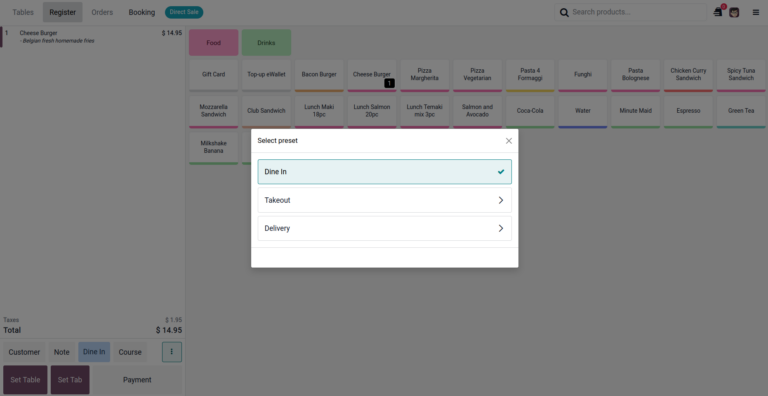
Businesses often have different modes of operation. A restaurant, for example, handles “Dine-in,” “Takeout,” and “Delivery.” In Odoo 19, these can be configured as distinct presets.
 
  • One-Click Context Switching: A waiter can switch from a “Dine-in” order to a “Takeout” order with one click.
  • Automated Configuration: Selecting a preset automatically applies the correct price list, fiscal position (tax rule), and even table requirements. If a user selects “Delivery,” the system prompts for a customer address; if they select “Dine-in,” it prompts for a table number.
guide to odoo 19 new features 10

Hospitality Enhancements

For restaurants, the workflow between the front of the house and the kitchen is tighter than ever.
  • Kitchen Display System (KDS): Waiters can now control the pacing of the meal. They can input a starter and a main course but only “Fire” the main course when the guests are ready. This updates the kitchen display instantly, ensuring food is cooked at the perfect time.
  • Combos: The POS natively handles combo products with complex logic. A customer ordering a burger combo can select a specific burger, a drink, and up to two sauces (with one being free). The system enforces these rules automatically, simplifying the cashier’s job.
  • Mobile Menu & QR Codes: Odoo 19 allows businesses to generate free QR codes that link to a mobile menu. This menu is not just a PDF; it is an interactive ordering platform where customers can pay online. Crucially, it integrates with product data to display allergen information automatically, pulling directly from the product description.
Looking for a Future-Proof IT Strategy?

Get in touch with us!

The foundation of every successful IT project is a well-thought-out strategy. We begin with a no-obligation initial consultation to understand your business, your goals, and how technology can move you forward.

4. Finance: Automation, Compliance, and Ease of Use

Accounting is often viewed as the most complex part of ERP implementation. Odoo 19 strives to lower the barrier to entry while increasing power for professional accountants.

The Audit Report Creator

Preparing annual audit reports is traditionally a time-consuming manual process. Odoo 19 introduces an Audit Report Creator that compiles these documents in minutes.
  • Dynamic Templates: Users can select the journals and date ranges they need. The system provides pre-made legal texts and dynamic fields that auto-populate with the correct financial data.
  • Customization: You can add annexes, extra pages, and documents directly from the Odoo Documents app.
  • Digital Signing: Once compiled, the report can be sent for digital signature to all relevant stakeholders directly within the platform.

Intelligent Reconciliation

Bank reconciliation has been revamped to be more accessible to non-accountants. The system automatically reconciles the majority of transactions by matching invoices and bills based on partners and amounts. For the exceptions, Odoo provides Action Buttons.
  • Guided Write-offs: If a transaction needs to be written off, the system provides clear descriptions to help users select the correct account (e.g., “Bank Fees” or “Exchange Difference”), reducing errors.
  • OCR Correction: If a bank statement scanned via OCR has an error, users can now manually correct the starting and ending balances by clicking directly on the numbers in the PDF preview.

Tax and Compliance

Managing international taxes is simplified with a new Tax Return Menu. This dashboard lists every tax return type required by the company’s localization (e.g., VAT, GST), displaying deadlines and submission statuses clearly. Furthermore, tax mapping has been moved from fiscal positions directly to the tax record itself, streamlining the configuration for companies operating across multiple jurisdictions.

5. Website and eCommerce: A Design "Glow-Up"

Odoo 19 brings the Website builder and eCommerce app up to modern design standards with what Odoo calls a “serious glow-up”.

Visual Merchandising

The new Catalog Block allows businesses to showcase collections (like “Best Sellers” or “New Arrivals”) with professional-grade templates. The shopping experience is more interactive; customers can hover over a product card to preview attributes like color, material, or size without leaving the page.
  • Product Pages: New templates allow for richer detailing, such as displaying wood types or fabric textures as variant images.
  • Google Integration: Once a product page is published, it integrates with Google Merchant Center. This pushes price, ratings, and reviews to Google Shopping, significantly improving ad performance and driving traffic.

Global Reach with AI

Expanding to new markets is often hindered by language barriers. Odoo 19 leverages AI to remove this hurdle. Users can generate compelling product descriptions or translate entire web pages into new languages with a single click. This automation includes SEO meta-data, ensuring the site ranks well in every language it supports.

Exciting industry news and updates on open source, Odoo and initOS solutions in our newsletter.
Subscribe now!

To be able to load the contact form, you must allow external services

Load content

6. Productivity and Back-Office Efficiency

Beyond the specific modules, Odoo 19 improves the general quality of life for users across the system.

Documents and AI Sorting

The Documents app now acts as an intelligent filing clerk. Users can use AI Prompts to define sorting rules. For example, you can tell the AI: “Contracts go into the Legal folder, Insurance documents go to HR”. When files are uploaded, the AI analyzes the content and routes them to the correct folder automatically. It can even create activities for specific users, like assigning a contract review to a legal consultant, based on the document type.

Project Management Automations

Project managers can now automate the administrative side of their work. Odoo 19 supports AI Automations within projects. You can configure the system to assign tasks to experts based on the content of a task or route opportunities to specific sales teams based on custom prompts. The interface also gains a drag-and-drop calendar view for easy scheduling.

Communication and VoIP

The VoIP (Voice over IP) interface has been redesigned for clarity. But the real power lies in the AI integration.
  • Real-Time Transcription: The system listens to calls, transcribes them, and even translates them in real-time.
  • Structured Summaries: After a call, Odoo generates a structured summary of the conversation, ensuring that no action items are lost.
  • AI Agents: For internal knowledge, users can consult AI Agents. You can ask a data security question, and the agent will answer based on your internal documentation sources.

7. The New Frontier: ESG and Industries

Odoo 19 expands the ecosystem with entirely new applications and a massive library of industry-specific solutions.

The ESG App

Sustainability is no longer optional; for many businesses, it is a regulatory requirement. Odoo 19 launches the ESG (Environmental, Social, and Governance) app.
  • Carbon Footprint Tracking: The app connects to international databases to access emission factors for thousands of items, from raw materials like steel to office supplies like printer paper.
  • Automated Calculation: When a company purchases a laptop, the app calculates the carbon footprint (e.g., 156kg of CO2) automatically. This data syncs in real-time, allowing businesses to export sustainability reports with a single click.

100+ New Industries

Odoo has always been generic software that can be customized. With Odoo 19, it becomes specialized out of the box. The release includes over 100 new industry-specific modules.
 
Examples:
  • Brewery: Managing invoices with specific excise taxes.
  • Real Estate: Connecting buyers and sellers effectively.
  • Wellness Center: Booking client appointments.
  • Construction: Preparing complex quotes.
  • Law Firm: Requesting documents from clients.
These modules provide tailored databases pre-configured for the specific workflows of these sectors, significantly reducing implementation time.

8. Data Intelligence: Spreadsheets and Charts

Data analysis in Odoo 19 becomes more visual and mobile-friendly. The Spreadsheet app, a powerful BI tool within Odoo, has added support for hierarchical data visualization.
 
  • New Chart Types: Users can now generate Radar, Treemap, Sunburst, and Geo charts. These are ideal for visualizing complex, multi-category data.
  • AI Generation: Users can simply type a request, “Show me sales by region” and the AI generates the exact view or chart required.
  • Command Palette: Power users can utilize the Command + K shortcut to access a command palette for rapid data manipulation.
  • Mobile Spreadsheets: These complex spreadsheets are now fully functional on mobile devices, allowing for deep analysis on the go.

Conclusion: Upgrade to Efficiency

Odoo 19 represents a maturity in the Odoo ecosystem. It moves beyond simply providing tools for business processes and starts providing intelligence for them. By automating the mundane data entry, document sorting, transcription, it frees up human capital for creative and strategic work.
 
The integration of AI is not a gimmick; it is woven into the practical realities of closing deals, managing stock, and serving food. Combined with the compliance power of the new ESG app and the versatility of the new industry modules, Odoo 19 helps businesses not just run, but scale.
For businesses looking to work faster, better, and with greater insight, Odoo 19 is ready to serve. As the release notes state: “You haven’t seen anything yet”.
 
If you have questions whether Odoo 19 is the right choice for you then we suggest you take a more hollistic approach and start with IT Strategy. If you are already an Odoo user and looking to migrate to version 19 then find more details here

To be able to load the contact form, you must allow external services

Load content

Latest Posts

guide to odoo 19 new features 11
ERP-Systeme

Odoo 19 Features | initOS

New Features of Odoo 19 Odoo 19: AI-Powered Workflows, Smarter Operations, and Limitless Scalability In the world of Enterprise Resource Planning (ERP) software, updates are often incremental—a button moved here, a report tweaked there. However, every few years, a release comes along that fundamentally shifts the baseline of what businesses expect from their software. Odoo

Weiterlesen »
The Statistical Reality of ERP Implementation Risk
Nicht kategorisiert

ERP Implementation: The Ultimate 7 Factors to Avoid

A Strategic Analysis of ERP Implementation Failure: A Definitive Guide on What to Avoid What are the defining factors of ERP Implementation Failure? ERP implementation is a profound, high-stake business transformation that fundamentally alters an organization’s core processes, data structures, and human workflows. While the advertised benefits include streamlined operations and better decision-making, the path

Weiterlesen »
Scroll to Top