
How to Set Up Any AI in Odoo 20
Table of Contents
AI in an ERP used to sound like a feature for the future. That has changed. Odoo 20 already uses AI for tasks such as natural-language assistance, content generation, document processing, and support workflows, while it also introduces an Odoo MCP server that allows external AI agents to connect an Odoo database.
But there is a practical question that matters more than whether Odoo has AI built in:
What happens when your company wants to use a different AI model?
Maybe your sales team wants an AI assistant that drafts customer follow-ups. Your accounting team wants to extract information from invoices. Your support team wants ticket summaries and suggested replies. And your IT team does not want all of these workflows permanently tied to one AI vendor.
That is the problem this blog addresses.
Consider a simple example. A salesperson opens an opportunity in Odoo and clicks Generate follow-up. Odoo sends the relevant business context to an AI service, receives a draft, and places that draft back into the CRM workflow for review.
The model could be OpenAI today, Claude tomorrow, Gemini later, or a model running on your own infrastructure.
The important part is not the model.
It is the integration architecture around it.
By the end of this blog, you will have an idea for connecting different AI providers to Odoo without rebuilding your business logic every time the underlying model changes.
What “Any AI in Odoo” actually means?
The phrase “AI in Odoo” can mean several different things. Treating them as the same thing makes architecture and purchasing decisions unnecessarily confusing.
For an Odoo 20 project, it is useful to separate two routes.
Route 1: Use Odoo’s native AI capabilities
The first option is simply to use what Odoo already provides.
Odoo’s AI documentation describes Ask AI, which can be accessed across the database and used for requests such as summarizing chatter, generating follow-up messages, improving text, and suggesting next steps. Odoo also provides AI agents, contextual prompts, AI-enabled fields, and workflow automations.
The website builder can also use AI to generate website content, while Odoo’s support workflows use AI to analyze tickets, generate summaries, and assist with repetitive support tasks.
This is the right starting point when your requirement already fits the standard Odoo workflow.
There is, however, an important distinction: using Odoo’s built-in AI is not the same as building a custom AI capability around a model of your choice.
Odoo’s current master documentation says that configurable AI agents support ChatGPT from OpenAI and Gemini from Google.
That brings us to the second route.
Route 2: Let an external AI assistant talk to Odoo through MCP
Odoo’s current documentation includes an MCP server based on the Model Context Protocol.
The basic idea is straightforward: Odoo acts as the server, while an external AI application acts as the client. The AI client can discover tools exposed by Odoo and invoke those tools to retrieve information or, where permitted, modify records.
This changes the direction of the integration.
Instead of: Odoo → AI provider
you have: External AI assistant → Odoo
For example, an MCP compatible assistant can be connected to an Odoo database and then use Odoo tools to answer questions about sales, invoices, inventory, or other business data.
Security still follows the Odoo user context. The MCP documentation describes authentication through an Odoo API key and explains that tools can be selectively exposed. By default, several retrieval-oriented tools are exposed, while other tools have to be manually made available in MCP. Read-only tools can also be marked to indicate that they do not modify data.
This is particularly interesting for companies that want to use AI assistants without building a custom Odoo interface for every interaction.
Prerequisites & environment
Before connecting an AI client to Odoo through MCP, make sure the following are in place:
-
Odoo 20 instance: A development or staging database is recommended for the initial setup and testing.
-
MCP compatible AI client: For example, Claude Code, Codex, Claude Desktop, or another client that supports MCP.
-
Node.js: Required for the client setup used in Odoo’s documented MCP connection method.
-
Odoo user account: The account should have access to the Odoo data and functionality you intend to expose to the AI client.
-
MCP enabled API key: Odoo requires an API key with the MCP scope for authentication.
-
Developer mode: Only needed when configuring or exposing additional Odoo tools and server actions.
You do not need to install an AI provider SDK inside Odoo for this MCP based approach. The AI client connects to Odoo through MCP, the implementation and client-specific configuration are covered in the next section.
Most importantly, do your initial experiments against staging.
An AI integration can potentially process customer names, addresses, emails, invoices, support conversations, product information, or other business records. Treat the integration as a “data processing system from the beginning, not as a harmless experiment”.
The integration architecture
One of the most important ideas to understand about AI and Odoo is that the AI does not always have to live inside Odoo.
Odoo can instead act as a Model Context Protocol (MCP) server, allowing an external AI client to communicate with the Odoo database through a controlled set of tools. Odoo’s current documentation describes the Odoo database as the remote MCP server and the external AI application as the MCP client.
This changes the direction of the integration.
Instead of building a separate connection between Odoo and every AI application, you can expose Odoo through MCP and let different MCP-compatible clients connect to the same Odoo endpoint.
The basic idea
The architecture can be understood in four layers:
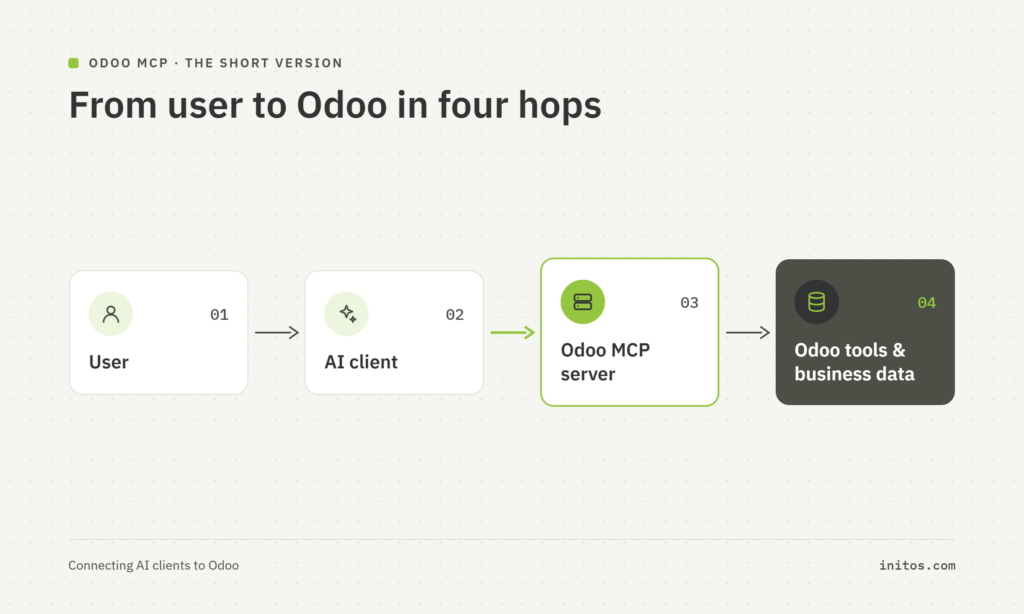
The AI client is the application the user interacts with. Depending on the workflow, that could be Claude Code, Codex, Claude Desktop, Google Antigravity, or another MCP-compatible client. Odoo’s current documentation specifically provides connection instructions for these clients.
The MCP protocol provides the common language between the client and server.
The Odoo MCP server receives the client’s requests and exposes tools that allow the client to work with Odoo.
The Odoo tools are the actual operations available to the AI, such as searching data, reading records, or invoking selected server actions.
The important part is that the AI client does not need direct access to PostgreSQL or to Odoo’s internal database structure. It works through the tools exposed by the MCP server. Odoo’s documented workflow is: the client connects, discovers available tools, the user submits a prompt, the client requests the appropriate tool, Odoo executes it, and Odoo returns the result to the client.
One Odoo server, different AI clients
This is where MCP becomes especially useful.
Imagine a company has developers using Claude Code while another team uses Codex. Without a common protocol, each application would need its own Odoo-specific integration.
With MCP, the architecture can instead look like this:
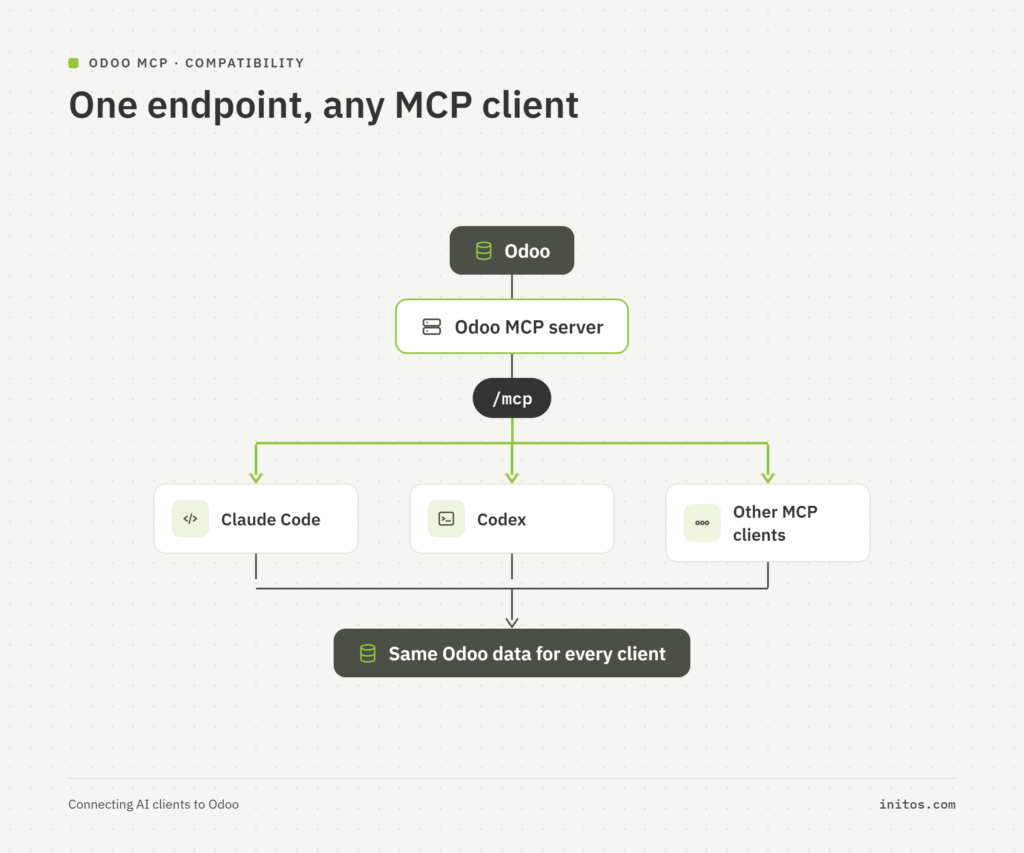
The client changes, but the Odoo side remains the common integration point.
Each client simply needs to support MCP and be configured to connect to the Odoo MCP server. Odoo’s current documentation demonstrates this approach for Claude Desktop, Claude Code CLI, Codex, and Google Antigravity.
What actually happens when a user asks a question?
Suppose a user tells an AI client:
“Show me my open opportunities grouped by sales stage.”
The user only sees the conversation with the AI client. Behind the scenes, however, the interaction follows a predictable path:
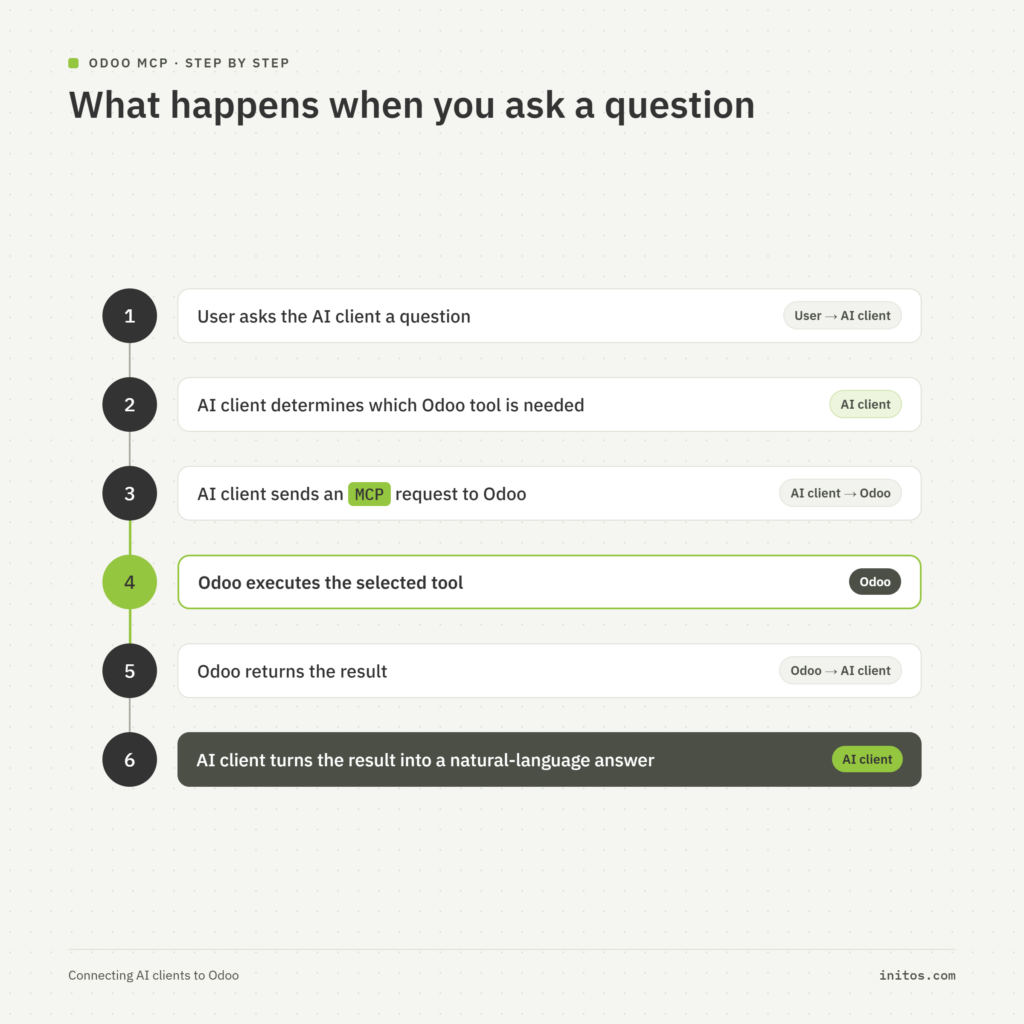
This is the core MCP workflow described in Odoo’s documentation. Odoo even provides examples involving sales pipeline analysis, inventory planning, historical reporting, record lookup, filtering, and other business tasks.
The AI does not automatically get unrestricted access
An MCP connection should not be thought of as giving an AI full access to Odoo.
Outgrown your legacy ERP system?
Contact us!
Get hands-on guidance for your Odoo implementation, configuration, and successful go-live transition.
Odoo exposes a defined set of tools. Its current documentation states that several tools are exposed by default, including tools for retrieving models and fields, initial context, searching, and reading groups. Other tools remain hidden until they are explicitly made available in MCP.
This creates a useful boundary:
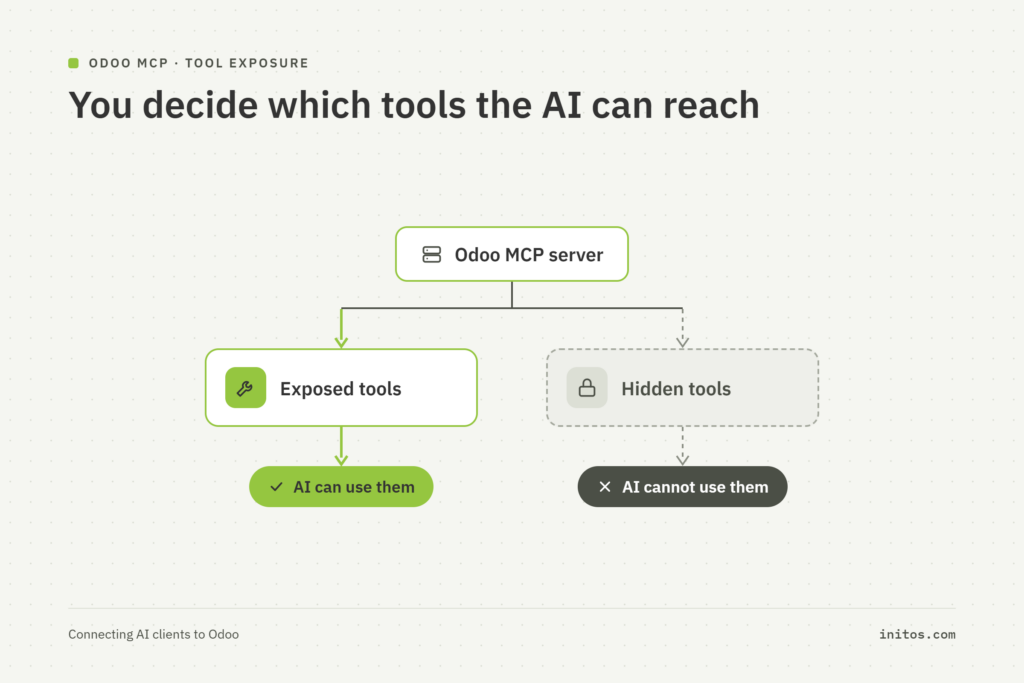
An administrator can expose additional server actions through Odoo’s technical settings. Odoo also provides a Readonly Tool option for tools that do not modify existing data.
That distinction matters.
There is a big difference between asking:
Find all overdue invoices.
and asking:
Change all overdue invoices.
A read operation and a write operation should not automatically receive the same level of access.
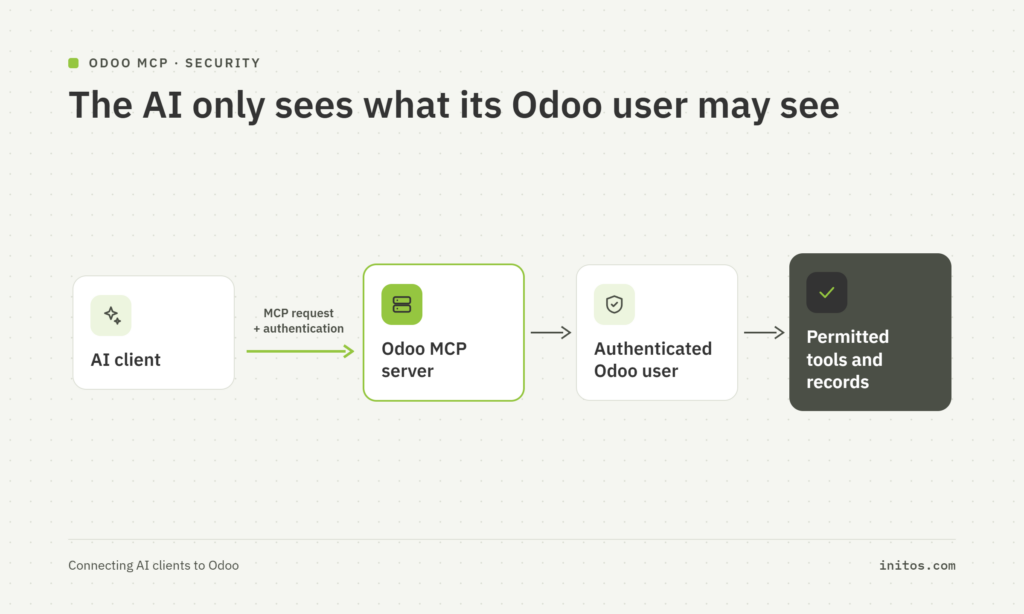
Authentication is still handled by Odoo
The AI client does not bypass Odoo’s normal user identity and permissions.
Odoo’s current MCP documentation requires an API key with the MCP scope. Requests made through the MCP server use that key to authenticate the user’s identity and permissions in the Odoo database.
Conceptually:
This is one reason MCP is more useful than simply handing an AI application database credentials.
The AI works through an interface designed around Odoo tools rather than receiving direct access to the underlying database.
MCP is a common connection layer, not an AI model
It is also important to keep the terminology straight.
Claude is an AI client.
Codex is an AI client.
Odoo’s MCP server is the Odoo-side gateway.
MCP is the protocol connecting them.
The language model itself is a separate component inside the AI client.
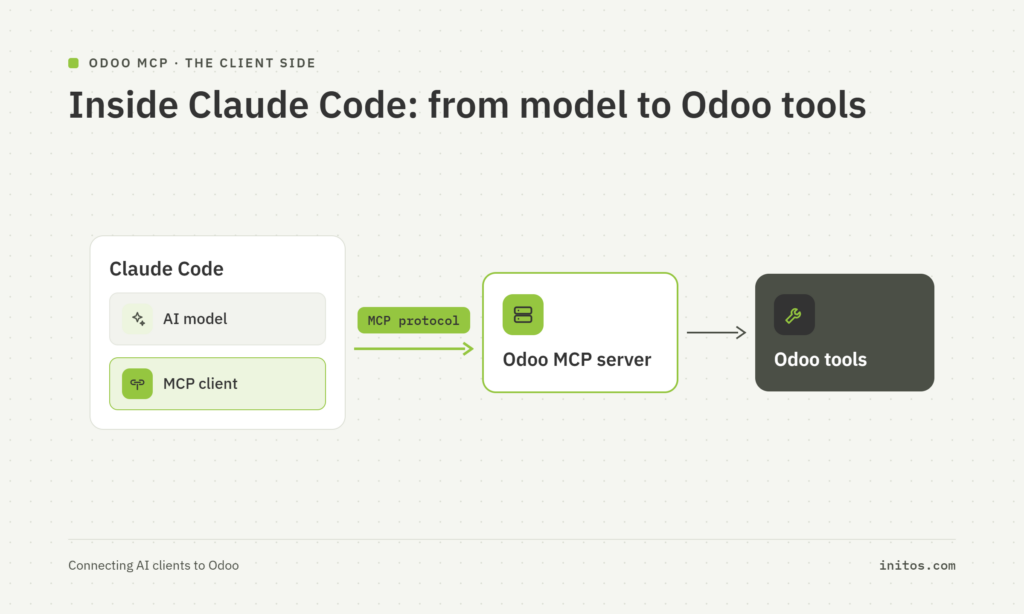
That is why the same Odoo MCP server can be useful with different AI applications.
The integration point is the protocol, not the model vendor.
Choosing your AI provider
There is no universal model choice. The correct provider depends on the workload, data requirements, operating model and commercial constraints.
| Provider | Strengths | Cost model | Where data goes | EU / GDPR & hosting considerations | Integration approach | Typical fit |
|---|---|---|---|---|---|---|
|
OpenAI |
Text generation, structured output, tools and a broad API platform |
API usage |
OpenAI infrastructure |
Review the applicable OpenAI business/API terms, retention and residency options for your contract |
Official SDK/API |
General-purpose business workflows |
|
Anthropic / Claude |
Text generation, structured conversations, tool use and strong API tooling |
API usage |
Anthropic infrastructure |
Anthropic states that inputs and outputs from commercial products are not used for training by default; contractual/privacy requirements still need review |
Official SDK/API |
Long-form text and agent-style workflows |
|
Google / Gemini |
Text and multimodal capabilities through the Gemini API |
API usage |
Google infrastructure |
Google’s paid Gemini API services have specific data-use and retention provisions; review the applicable service terms |
Google SDK/API |
Multimodal and Google-centric environments |
|
Self-hosted / open models |
Control over deployment and infrastructure |
Infrastructure + operations |
Your infrastructure |
Can support strict data-residency requirements because inference can run within your environment; GDPR compliance still depends on the complete system |
Local/API endpoint |
Sensitive or controlled workloads |
|
Odoo native AI |
Native Odoo context and workflow integration |
Odoo plan/service dependent |
Depends on the configured provider and Odoo deployment |
Must be assessed according to the actual provider, deployment and data flow |
Odoo-native configuration |
Standard Odoo workflows |
OpenAI states that inputs and outputs from its API are not used to improve its models by default. Anthropic similarly states that commercial-product inputs and outputs are not used to train its models by default. Google’s Gemini documentation makes a similar distinction for paid services, while also documenting limited retention for abuse monitoring.
For self-hosting, projects such as Ollama provide local model execution and an OpenAI-compatible endpoint, while vLLM provides an HTTP server compatible with several OpenAI API interfaces.
The important word here is compatible. A compatible API does not mean identical model behavior. Prompt formats, tool support, structured output, context limits and model quality can still differ.
That is exactly why the service abstraction matters.
When choosing a provider, compare four things first: the business task, the sensitivity of the data, the required latency and the total operating cost.
Step-by-step implementation: connecting Claude Code, Codex, and other MCP clients to Odoo
The section 4 explained the architecture. Now we can implement it.
The implementation consists of four main parts:
-
Prepare Odoo authentication
-
Configure the Odoo MCP endpoint in the AI client
-
Expose the Odoo tools the client is allowed to use
-
Test the connection and verify permissions
Odoo’s current MCP documentation explicitly uses this general setup and provides client-specific instructions for Claude Desktop, Claude Code, Codex, and Google Antigravity.
Step 1: Prepare your Odoo environment
Start with an Odoo instance that you are comfortable testing against.
For a first implementation, use a development or staging database rather than immediately connecting an AI client to production.
At this stage, you should know your Odoo database URL, for example:
The MCP endpoint is formed by adding /mcp:
Step 2: Create an Odoo API key for MCP
The client needs a way to authenticate with Odoo.
In Odoo, open:
My Preferences → Security
Create a new API key and select the MCP scope.
Odoo also lets you define an expiration period for the key. The documentation notes that the generated key is displayed only once, so save it securely when it is created.
You now have two values:
Odoo MCP URL:
https://example.odoo.com/mcpAPI key:
<your-generated-key>
Treat the API key as a secret.
Do not put it in a public Git repository or paste it into screenshots that will be published.
Before configuring the AI client settings make sure to install the following:
-
An MCP-compatible AI agent (e.g., Claude Code, Antigravity, Codex)
-
Node.js (required to run the npx command)
Step 3: Connect MCP Client to Odoo
Connect with Claude Code to Odoo:
Odoo’s documented Claude Code setup uses mcp-remote to connect the CLI to the remote Odoo MCP endpoint.
Run:
claude mcp add --transport stdio odoo -- \
  npx -y mcp-remote https://example.odoo.com/mcp \
  --header "Authorization: Bearer <API_KEY>"
Replace the database URL and API key with your own values. Odoo documents this exact connection pattern for Claude Code CLI.
You can then check the connection with:
claude mcp list
Odoo’s documentation recommends this command for checking the configured MCP server.
Conceptually, the connection now looks like:
Claude Code
    │
    ▼
mcp-remote
    │
    │ HTTPS + Authorization header
    ▼
https://example.odoo.com/mcp
    │
    ▼
   Odoo
The mcp-remote process is part of the client-side connection setup. It is not the Odoo MCP server itself.
Connect Codex to Odoo
Codex can be configured in a similar way.
You can add the server from the Codex CLI:
codex mcp add odoo -- \
  npx -y mcp-remote https://example.odoo.com/mcp \
  --header "Authorization: Bearer <API_KEY>"
Odoo’s current documentation also provides a configuration-file approach using ~/.codex/config.toml:
[mcp_servers.odoo]
command = "npx"
args = [
    "-y",
    "mcp-remote",
    "https://example.odoo.com/mcp",
    "--header",
    "Authorization: Bearer <API_KEY>"
]
Odoo documents both approaches and recommends using /mcp inside Codex to inspect the server connection.
The important thing to notice is that the Odoo MCP endpoint has not changed.
Claude Code and Codex are simply different clients connecting to the same Odoo server.
Step 5: Understand what the client discovers
Once the connection succeeds, the MCP client asks Odoo which tools are available.
Odoo’s current documentation says the database exposes several tools by default, including:
-
AI Tool: Get Fields
-
AI Tool: Get Models
-
AI Tool: MCP Retrieve initial context
-
AI Tool: Search
-
AI Tool: Read group
Other tools must be manually exposed.
You can think of this as tool discovery:
AI client
   │
   │ “What can I do?”
   ▼
Odoo MCP server
   │
   ├── Search
   ├── Read
   ├── Get Models
   ├── Get Fields
   └── Other exposed tools
The client does not need a hardcoded list of every possible Odoo model or action.
It discovers the capabilities available through the MCP server.
Step 6: Expose additional Odoo actions
This is where Odoo becomes more powerful.
Suppose you want an AI client to perform a specific Odoo action that is not exposed by default.
In Odoo, enable developer mode and go to:
Settings → Technical → Server Actions
Open the relevant server action.
In the Usage section, select:
Available in MCP
This is the mechanism for exposing additional server actions to MCP clients. You can also select Readonly Tool when the action does not modify existing data.
Conceptually:
Odoo Server Action
       │
       ├── Available in MCP = OFF
       │       ↓
       │    Hidden from AI
       │
       └── Available in MCP = ON
               ↓
          Available to AI
This is an important design decision.
Do not expose every action simply because you can.
Start with the smallest set of tools required for the workflow.
Step 7: Test a read-only workflow
Before allowing an AI client to modify data, start with a simple read request.
For example:
“Show me my open opportunities grouped by stage.”
A successful interaction looks like:
User
  ↓
Claude / Codex
  ↓
MCP request
  ↓
Odoo Search tool
  ↓
Odoo CRM data
  ↓
Result
  ↓
Claude / Codex
  ↓
Natural-language answer
At this point, verify that the AI client sees only the records the authenticated Odoo user is supposed to see. Afterwards you can play with different available workflow.
Step 8: Connect another MCP client without rebuilding the Odoo integration
This is where the architecture pays off.
You can now configure another MCP-compatible client with same Odoo MCP:
Claude Code ──┐
              │
Codex ────────┼── Odoo /mcp
              │
Other Client ─┘
You are not creating:
-
Odoo ↔ Claude integration
-
Odoo ↔ Codex integration
-
Odoo ↔ another client integration
Instead, the common connection point is:
Odoo ↔ MCP
Each client simply implements the MCP side of that connection.
Step 9: Apply production security before wider rollout
A successful test is not the same thing as a production-ready integration.
Before connecting broader business workflows, review:
Authentication: API keys should be scoped appropriately and given an expiration period.
Permissions: the MCP client operates using the authenticated Odoo user’s identity and permissions.
Tool exposure: expose only the tools the business actually needs.
Write access: distinguish carefully between read-only tools and tools that create, modify, or delete data.
Testing: use staging and representative test data before opening the connection to production users.
Odoo’s MCP documentation makes the authentication, permissions, tool exposure, and read-only/write distinctions part of the documented setup itself.
What have we achieved?
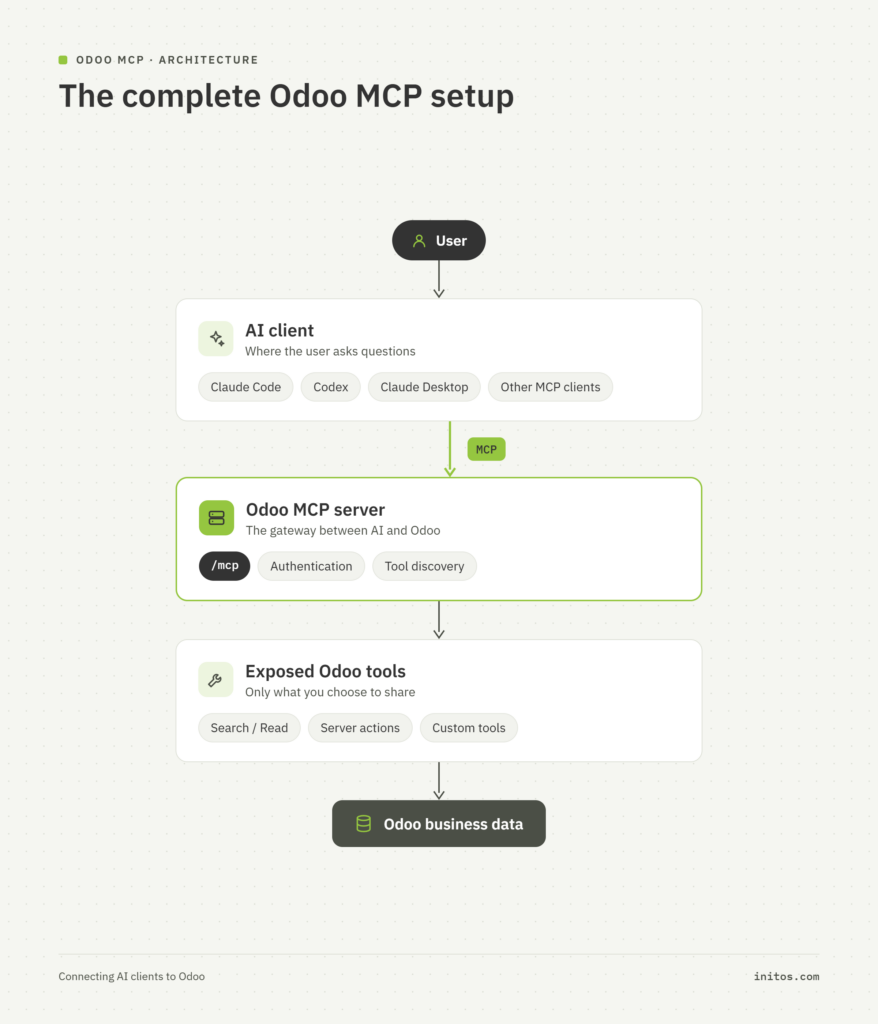
The important takeaway is that you are not building an AI integration separately for every client.
You are exposing Odoo through MCP, and MCP-compatible clients can then use that common interface.
Real Odoo use cases
The technical architecture matters because it turns AI into something that can participate in an actual business process.
Sales and CRM
An AI service can draft customer outreach, summarize long opportunity histories, or transform notes into structured follow-up actions.
The key outcome is not “AI-generated text.” It is reducing the amount of manual preparation required before a salesperson can act.
Odoo already provides contextual AI assistance around records, including model-specific prompts and record context.
Accounting and invoicing
Document processing is a natural AI use case because the input is often unstructured while the business process requires structured fields.
Odoo’s document digitization capabilities use OCR and AI to extract information from documents and populate accounting records.
A custom integration can go further where a company’s particular document formats or validation rules require additional processing.
Support and Helpdesk
Support teams spend substantial time reading tickets, identifying the issue, finding relevant information and preparing responses.
Odoo’s current AI support documentation describes ticket summarization, AI-generated fields, support agents and automations that can analyze tickets when they are created or changed.
A custom integration can connect those workflows to a model selected specifically for the organization’s data and response requirements.
Inventory and purchasing
Supplier communications, purchasing notes and internal planning documents often contain useful information that is difficult to structure manually.
AI can be used to summarize supplier correspondence, extract action items or draft internal and external messages, provided the workflow defines what the model is allowed to infer and what it must never invent.
Knowledge and RAG
A knowledge assistant is another strong application.
Instead of asking an AI model to “know” the company’s policies, products or operating procedures, the application can retrieve relevant company information and give that material to the model as context.
Odoo’s AI framework already supports sources such as documents, web links, PDFs and Knowledge articles for agents.
The business benefit is straightforward: employees can search information using normal language rather than remembering exactly where a document was stored.
Production considerations
Getting a response from an AI API proves almost nothing about whether the solution is ready for production.
The difficult questions start when real customer data, thousands of requests and business-critical workflows are involved.
Security
Keep API credentials outside source code. Use the smallest practical permissions, restrict who can configure AI services, and avoid giving AI agents broad database access simply because it is technically possible.
Odoo’s access-control model is built around permissions for users and groups, and its MCP implementation adds another layer by allowing individual tools to be selectively exposed.
For MCP especially, distinguish between tools that only read information and tools that modify data is really important.
Data privacy and GDPR
The first question should be:
What exactly leaves Odoo?
Sending “the customer record” to an external AI service is too vague. Identify the actual fields and attachments being transmitted.
Names, email addresses, invoices, employee information and support conversations may all contain personal data.
The European Commission explains that when another organization processes personal data on behalf of a controller, the processor relationship and obligations must be governed by a binding contract or legal act.
For hosted AI, therefore, review the provider’s applicable commercial terms, data-processing documentation, retention rules and hosting/residency options.
Self-hosting can reduce the amount of data leaving your environment, but self-hosting does not automatically make an application GDPR compliant. Access control, retention, lawful processing, security, monitoring and the rest of the processing chain still matter.
Cost control
AI costs can become surprisingly difficult to predict when a workflow runs at scale.
Track usage. Keep prompts focused. Avoid sending unnecessary Odoo fields or complete document histories when only a small portion is relevant.
Use smaller or faster models for simple classification and summarization tasks where appropriate, and reserve more expensive models for tasks that actually require them.
Reliability and performance
An Odoo browser request should not wait indefinitely for an external model.
Set explicit timeouts. Handle rate limits and transient failures. Define what the user sees when an AI service is unavailable.
For workflows that do not require an immediate response, process the AI request asynchronously using appropriate background processing rather than holding the user’s Odoo request open.
Odoo itself uses scheduled background actions for queued work, while more specialized queue processing can be introduced depending on the deployment architecture.
Observability
Log enough information to understand failures without creating a second data-privacy problem.
A useful production record may include:
provider and model identifier,
workflow name,
request status,
latency,
token or usage information where available,
error category,
prompt/version identifier.
Do not automatically dump complete prompts, customer records and AI responses into unrestricted logs.
For prompts that drive important workflows, version them and test changes before deploying them.
OpenAI’s current documentation explicitly recommends pinning production applications to model snapshots and building evaluation suites because model behavior can change between versions.
Anthropic’s SDK also documents handling for rate-limit, connection and server errors, including retries and configurable timeouts.
Common pitfalls and troubleshooting
“The Odoo page freezes while AI is generating a response.”
The likely problem is synchronous processing inside a user request.
Fix: use explicit timeouts, failure handling and asynchronous processing for workflows that can run in the background.
“Our API key appeared in a log or Git repository.”
Secrets were treated like configuration rather than credentials.
Fix: move credentials to environment-based or dedicated secret storage and review application logs for sensitive values.
“Changing AI providers means rewriting half the module.”
The provider was wired directly into business logic.
Fix: use the adapter/service pattern described earlier. The CRM, accounting or helpdesk workflow should call your own AI interface.
“The AI bill became much larger than expected.”
The architecture is working, but usage has not been controlled.
Fix: measure requests, input and output volume, choose models by task, reduce unnecessary context, and add usage monitoring before rolling the feature out widely or perhaps use self-hosted models and mcp clients.
Conclusion: Odoo 20 does not have to mean one AI provider
The most important idea in an Odoo AI project is not which model you select first.
It is how tightly you connect that model to the rest of the system.
Odoo now has several ways to work with AI. Its native AI functionality can assist users inside the ERP. Its MCP server can expose Odoo capabilities to compatible external AI assistants. And custom modules can call external or self-hosted models as part of the company’s own business workflows.
For custom integrations, a small provider-independent service layer gives you a practical boundary:
Odoo business logic stays focused on the business. AI adapters stay focused on the model provider.
That means a future provider change does not automatically become a business-process rewrite.
It also gives management something more important than a model comparison: an architecture that can evolve.
Your Next Step
Do you want to learn about Odoo?
Choosing ERP system is only the first step. The real growth happens when you have a partner who understands your business processes. We specialize in mapping complex operational needs to flexible, open-source architectures that keep you in the driver’s seat.

Latest Posts
Sustainable Software Design: A Strategic Guide for IT Leaders
Sustainable Software Design: A Strategic Guide for IT Leaders Table of Contents Sustainable software design is no longer a CSR side project. In the EU, it now touches energy law, cybersecurity law, consumer law and sustainability reporting, and it directly shapes your cloud bill. For CIOs, CTOs and IT directors in Germany and across Europe,
How to Set Up Any AI in Odoo 20
How to Set Up Any AI in Odoo 20 Table of Contents AI in an ERP used to sound like a feature for the future. That has changed. Odoo 20 already uses AI for tasks such as natural-language assistance, content generation, document processing, and support workflows, while it also introduces an Odoo MCP server that
To be able to load the contact form, you must allow external services